یک نرم افزار کاملا مهندسی و به درد بخور که خودم خیلی دنبال لینکش گشتم رو براتون می گذارم تا استفاده کنید.


Mona: Mona is a symbolic circuit analysis program capable of computing voltages and currents in terms of component variables.
Lisa: Lisa is a "classical Feedback Control Systems" application designed to handle typical calculations in the 's' and 't' domains
Formulae 1: (F1) is a powerful and easy to use Computer Algebra System designed specially for the teaching and exploration of mathematics
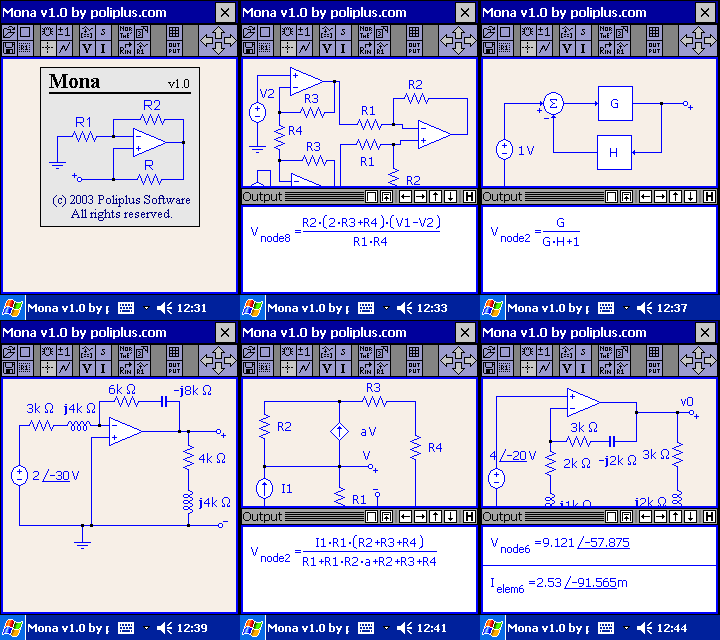
Mona comes loaded with useful features designed to help you understand analog circuitry, some of these include;
Complete schematics capture front end supporting 90 degree rotation of components and multi-segment wires that allows any circuit to be drawn as found on textbooks. Supports file save and load circuit files.
Rich list of analog components including : resistor, capacitor, inductor, impedance, infinite gain opamp, finite gain opamp, adder and multiplier (for control systems), ground, opened circuit nodes, closed circuit branch, voltage and current controlled voltage source, voltage and current controlled current source, voltage source and current source.
Basic electrical engineering calculations : node voltage, branch current, resistance into a node and Norton/Thevenin equivalence, all performed symbolically. Values, Symbols, Imaginary numbers as well as Phasors can be associated to components.
2D Equation editor for editing values, symbols and expressions that can be attached to components. Expressions are most useful when working with block diagrams with the control systems components (adder and multiplier). The editor handles standard SI prefix common in electrical engineering (micro, milli, kilo, mega, nano, pico, giga and tera).
Lots of sample circuit files to show you what the software can do and to help you get started as soon as possible.
Easy to use, on device Help system that provides detailed explanation on every button
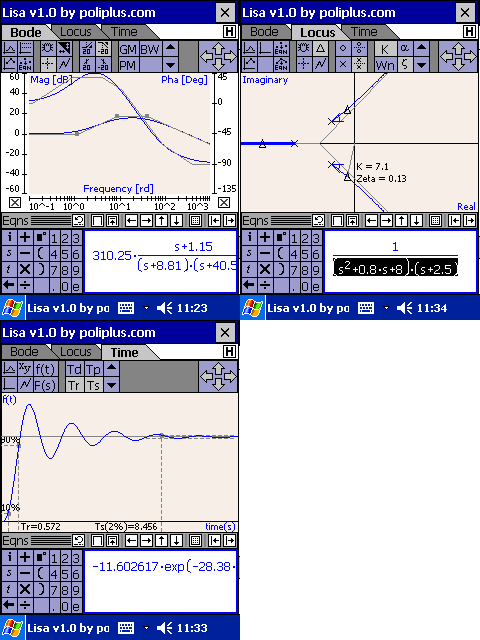
Line approximation for phase and magnitude plots that allows users to adjust an existing transfer function or completely design one from scratch. Line approximation nodes are draggable and can be manipulated by the user graphically while the system keeps track of its equation. Users can generate line approximation from s-domain equations and/or via user interface by adding/deleting/modifying nodes from the line approximation. This is a great feature not found anywhere else that not only has tremendous pedagogical value but also eases bode design in general
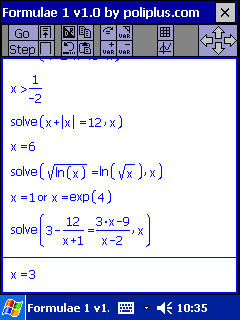
Simple to use and well organized Graphical User Interface featuring tabs, buttons, palettes, command folders and extensive built-in help system with tons of sample mathematical problems.
Fast automatic simplification of expressions containing symbols and functions.
Correct 2D display of mathematics including proper use of symbols such as fraction divider, absolute value, radicals, derivatives, integrals, etc.
Math Editor builds expressions graphically as they are typed providing an intuitive environment to deal with mathematics.
Powerful command center via Go and Step. Just build a query and press Go to obtain the final answer to the query or step to obtain the next step in the calculation process. With these two commands, all the user needs to know is how to type a query (problem) in and from there on the system will solve it and show intermediate steps as required by the user automatically.
Powerful automatic Solve facility capable of solving symbolically in one shot or via steps, equations containing absolute value, radicals, polynomials, inequalities and systems of equations.
Main commands for factorization, evaluation (turning a symbolic expression into a number) and simplification of expressions.
Trigonometric Functions: sin, cos, tan, csc, sec, cot, asin, acos, atan, acsc, asec and acot. Special stepwise emphasis was placed here to deal with removing extra revolutions (in radians and degrees) as well as folding trigonometric expressions in quadrants II, III and IV into quadrant I, this has great pedagogical value to students learning trigonometry.
Logarithmic Functions: ln, log, log of base b and exp.
Miscellaneous Functions: mixed fractions conversion, absolute value, square root, nth root, factorial, exponential notation, imaginary numbers and user defined functions.
Calculus support: Derivatives, Integrals, Integration by Parts and Integration by Variable Substitutions. Stepwise Integration highlights automatically specific integration techniques such as using Partial Fractions expansion, long division and integration by parts or a special variable substitution.
Matrix Support: Full Matrix Arithmetic, Row Operations and Matrix Functions including (determinant, adjoint, matrix inverse, transpose and others). Of special mention here is the stepwise calculation of matrix inverse by using row operations. The system will automatically show row operations used to inverse any matrix (even symbolic ones) and then it will perform the actual row operation. Tremendous Pedagogical value to users.
Polynomial Support: permutations, combinations, grouping, complete the square, splitting fractions, long division and partial fractions.
Powerful Variable and Function Isolation that allows the user to manually manipulate equations step by step.
Easy object based graphing. Unlimited plots can be removed or added at will
نیازمندی ها:
Pocket PC 2002 or later & Insignia's Jeode Java Virtual Machine
دانلود:
Please Login or Register to see this codeیا
Please Login or Register to see this code